
The business context layer for data and AI
Magnowlia uses a four-layer ontology framework to give your data a clear business meaning. Define metrics, dimensions, and relationships in business terms — then let any AI system use that context: analytics agents, customer support bots, coding assistants, or ops automation. Your ontology is the single source of truth that keeps every consumer consistent.
One definition, everywhere
Define each metric once — formula, grain, filters — and every dashboard, AI answer, and ad-hoc query resolves to the same number. No more reconciliation across teams.
Context for any AI agent
Your ontology is a machine-readable business map. Analytics agents use it for SQL generation. Support agents use it for product relationships. Coding agents use it to understand your domain model.
Governance in Git
Ontologies are Turtle text files in Git. Branch, diff, review, merge — the same workflow your engineers already use. Every change is auditable without a heavyweight catalog tool.
The four-layer architecture
Each layer has a clear responsibility. Business concepts sit at the top, physical tables at the bottom, and the mapping and vocabulary layers bridge between them.
Business Domain
Your actual business entities: customers, orders, products, campaigns. Defined as OWL classes with properties and relationships that mirror how your business thinks about data.
Business Vocabulary
Framework types for defining metrics (e.g. Total Revenue, Conversion Rate), time dimensions, business constants, and access control policies. This is where metric expressions, SQL templates, and data governance rules live. View vocabulary →
Mapping
Links business concepts to the physical database: mapsToTable, mapsToColumn, join conditions. This is what makes every metric traceable to its source. View vocabulary →
Technical
The physical database schema: tables and columns in your data warehouse (BigQuery, Snowflake, PostgreSQL, Redshift). Imported automatically when you connect a data source.
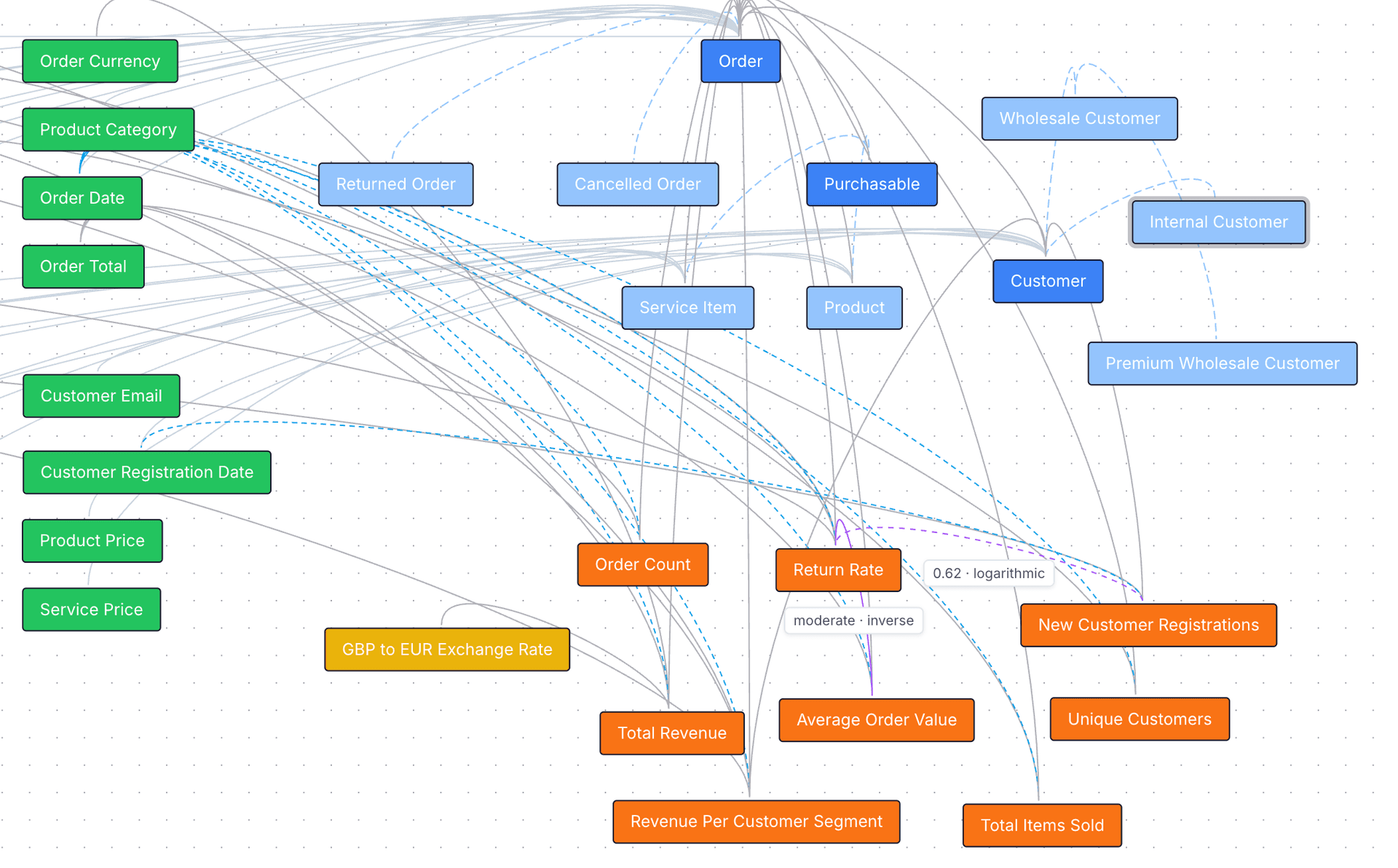
Visualize your ontology
Explore your business domain as an interactive graph. Classes, properties, metrics, and their relationships are rendered as color-coded nodes and edges — making it easy to understand how your data connects.
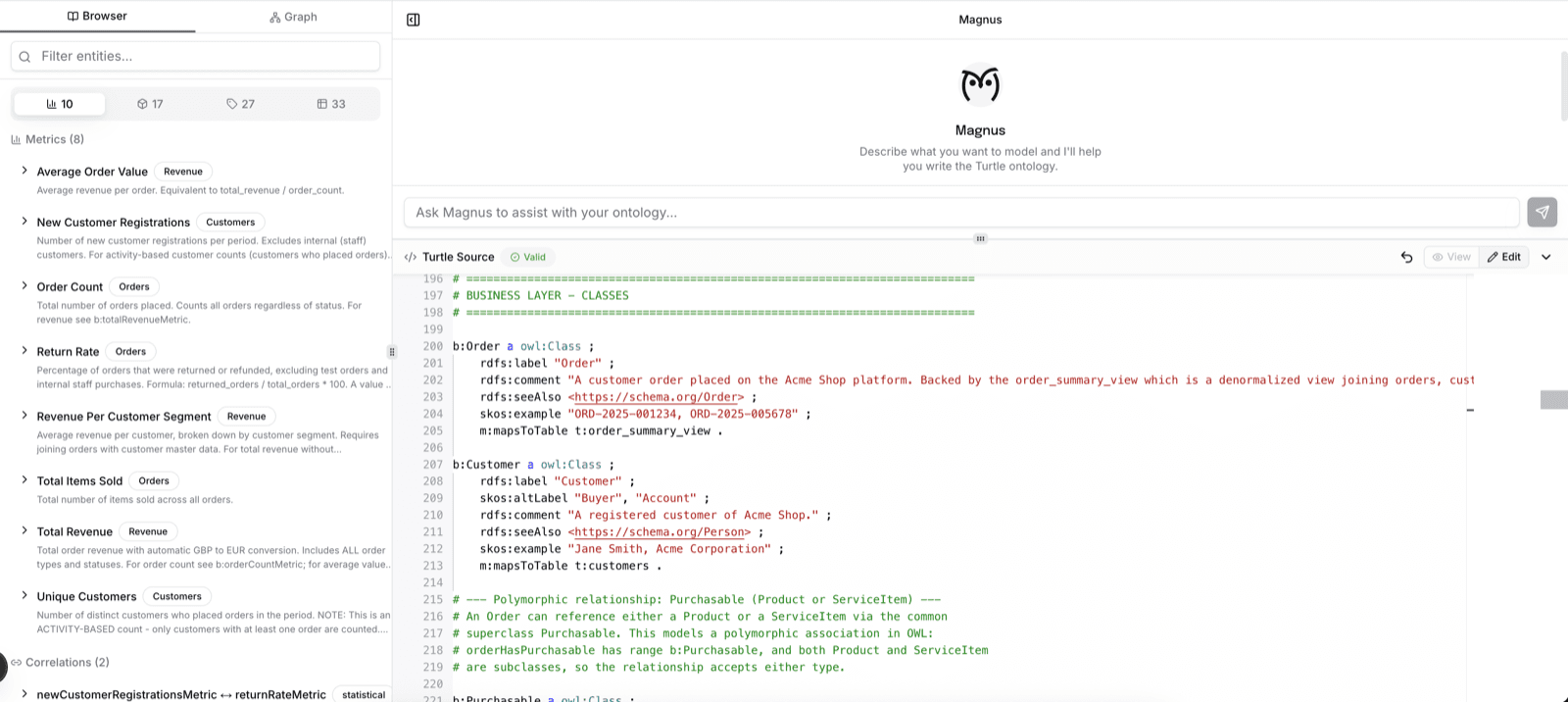
AI-powered ontology editing
Magnus, Magnowlia's built-in AI agent, helps you build and refine your ontology. Describe what you want to model in plain English and Magnus generates valid Turtle syntax, suggests metrics, and maps business concepts to your database schema — all in a three-panel editor with live validation. The ontology you build powers Magnowlia's analytics today and is reusable by any AI system that needs to understand your business.
Learn more
Understanding
What is a business ontology?
Learn what a business ontology is, why it matters for analytics and metrics, and how it differs from a simple data dictionary.
Learn more →Benefits of an ontology
Consistent metrics, traceability, and a single source of truth. See how an ontology improves your semantic layer and AI analytics.
Learn more →Ontology examples
Real-world Turtle snippets for e-commerce, SaaS, and marketing. See how to model metrics, dimensions, and relationships.
Learn more →Comparisons
Ontology and semantic layer
How a business ontology underpins a semantic layer and powers Magnowlia's ontology-based metrics and dimensions.
Learn more →Ontology vs data dictionary
Compare scope, relationships, metrics, AI-readability, and traceability. Learn when you need each.
Learn more →Ontology vs data catalog
Compare discovery, metrics, relationships, AI-readability, governance, and lineage. Learn when you need each.
Learn more →AI & Technical
Access control in the ontology
Define metric visibility, row-level security, and column masking directly in your ontology using bv:AccessPolicy and bv:RowFilter.
Learn more →Ontology for AI
Why any AI system needs structured domain context, and how an ontology gives agents the definitions and relationships they need — starting with analytics.
Learn more →Technical documentation
Vocabularies and sample ontologies in OWL/Turtle for implementers and developers. Use these when building or extending ontologies that integrate with Magnowlia.
Mapping vocabulary
Classes and properties for mapping business concepts to physical database structures (prefix m:).
View →Business vocabulary
Framework vocabulary for defining business metrics, time dimensions, constants, and access control policies (prefix bv:).
View →Acme Shop sample ontology
A complete example ontology for an e-commerce platform: technical, mapping, business vocabulary, and business domain layers.
View →Example: Acme Shop ontology
See how a real ontology looks. The Acme Shop example models an e-commerce platform with all four layers.
b:Order a owl:Class ;
    rdfs:label "Order" ;
    rdfs:comment "A customer purchase transaction" ;
    m:mapsToTable t:public.orders .

b:totalRevenueMetric a bv:Metric ;
    rdfs:label "Total Revenue" ;
    bv:metricExpression "SUM(b:orderTotal)" ;
    bv:timeDimension b:orderDate ;
    bv:sourceEntity b:Order ;
    bv:metricCategory "Revenue" .
The business class b:Order maps to a physical table, and the metric b:totalRevenueMetric defines exactly how revenue is calculated. View the full Acme Shop ontology →
Frequently asked questions
What is a business ontology?+
How is an ontology different from a data dictionary?+
What format does Magnowlia use?+
Do I need to know Turtle syntax?+
Can I use my existing semantic layer?+
Can the ontology be used by AI systems other than Magnowlia?+
What data sources are supported?+
Built on open standards
Magnowlia ontologies use W3C standards: OWL for classes and relationships, RDFS for labels and descriptions, SKOS for alternative labels, and Turtle as the serialization format.
Give your business a shared language
Define your business ontology once. Use it for analytics today, and for any AI agent tomorrow. No credit card required.
Get Started Free